
The Fallback Line Nobody Reads
Every Slack message this system sends carries the same content twice — once as a formatted card and once as a plain line nobody in the channel will ever read. Drop the second and the message still looks perfect in Slack, while the phone notification that actually reaches somebody goes blank.
Slack has two message formats and most integrations only know about one of them. You build a card — a heading, some text, a button — send it, and it renders beautifully in the channel. The screenshot goes in the release notes. Then someone whose approval is blocking a purchase order gets a push notification on their phone that says nothing at all, and nobody connects the two facts for months.
The card is not the message
A modern Slack message is a list of structured blocks: a section with some text, a row of buttons, a small grey context line at the bottom. That structure is what Slack renders in a channel, and it is genuinely good — the message looks like it belongs there rather than like something a robot pasted in.
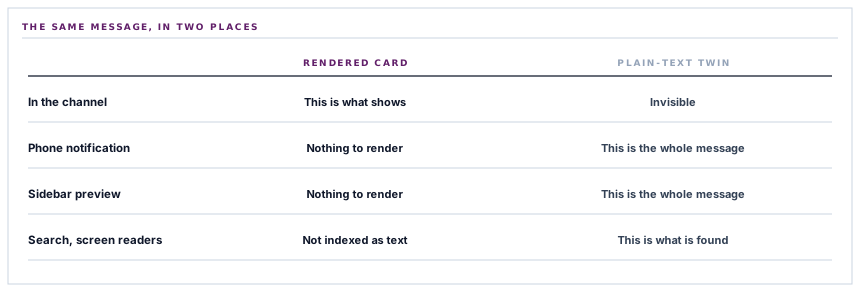
But blocks are only rendered where there is somewhere to render them. Several places in Slack's own product need a plain string instead:
| Where | What it shows | Why blocks will not do |
|---|---|---|
| A push notification on a phone | One line of text on a lock screen | There is no layout to render into |
| The channel list in the sidebar | A one-line preview under the channel name | A single line of space |
| A desktop banner | Sender and a snippet | Same — it is a snippet, not a canvas |
| Search results | The matched text | Search indexes text, not layout |
| Accessibility tooling | What a screen reader announces | A structural card needs a text equivalent |
So the payload carries a plain-text field alongside the blocks, holding the title and the body joined by a newline. In the channel it is invisible — Slack shows the card. Everywhere in that table, it is the entire message.
The field that shows up in none of your screenshots is the one that reaches the person who has left their laptop.
Why this is a very easy thing to get wrong
Because omitting it is not an error. Slack accepts the message, returns success, and posts it. The channel looks right. The integration is, by every check anybody would run, working.
What changes is what the notification says, and the person who sees that is not the person who built or tested it. They see a notification with a sender and nothing else, decide it is noise, and either ignore it or mute the channel. The feature does not break — it stops being read, which is worse, because there is no symptom to investigate.
It is the same category as a badge that renders dark on dark, or an email whose preview text is a tracking pixel. The artefact is fine. The place it actually gets consumed is empty, and nobody who could fix it ever looks there.
What a notification is made of
Every operational message this system can send to a chat tool is built from the same four ingredients, and only the first is required.
-
A title
The one line that has to carry the message on its own — because on a phone it will be the only line. Bold in the channel, plain everywhere else.
-
A body
The detail, when there is detail worth sending. Omitted entirely rather than sent empty, so a short notification is short rather than padded.
-
A link back
Rendered as a primary button in the channel. Notifications that only tell you something happened make people go and find it; a button is the difference between a message and an errand.
-
A context line
Small, grey, at the bottom. Where the message came from — useful when three systems post into one channel and everything starts looking the same.
Each optional piece is genuinely omitted when absent rather than included as an empty shell, which is why a short alert does not arrive with a blank button under it.
Three characters that have to be escaped, and two that must not be
Slack's text format reserves three characters — an ampersand and the two angle brackets — because they are how Slack encodes links and mentions. A supplier called Kimani & Sons dropped into a message unescaped is at best rendered oddly and at worst read as the start of something structural.
So the title, body and context line are escaped before they go into the payload. That is the correct treatment for those three fields, and it is the wrong treatment for the two beside them.
The button's URL is a URL, not formatted text, and escaping it would corrupt any address containing an ampersand — which is most addresses carrying more than one parameter. The button's label is declared as plain text in the payload, which means Slack is already treating it literally and a second pass would show the escape codes to the reader.
Escaping is per context, not per payload. Three fields in one message need it and two do not, and the way to get that right is to know which format each field is in rather than to apply a blanket rule and hope.
What is in place, layer by layer
The Slack message, end to end
A formatted card in the channel
A bold heading, the detail below it, a primary button and a small grey source line — built as structured blocks so it looks native rather than pasted.
A plain-text twin
Title and body as one string, carried alongside the card, which is what a phone notification, a sidebar preview and a search result actually display.
Optional pieces genuinely omitted
No body means no second block; no link means no button. A short message arrives short instead of padded with empty furniture.
Escaping applied per field
The three formatted-text fields are escaped for Slack's control characters. The URL and the button label are not, because they are not in that format.
A link back on every message that has one
The button carries a caller-supplied label, so an approval says Review the request rather than the same generic word on every notification.
A refusal before the call
An incomplete configuration returns a reason instead of attempting a request, so a half-configured connector reads as unconfigured rather than as broken.
A bounded wait
A ten-second timeout, so a chat provider having a bad afternoon cannot hold up the work that raised the notification.
The provider's rejection passed through
A refused message surfaces Slack's own status and body rather than a generic failure, because a revoked webhook and a malformed payload need different fixes.
A test message that proves the route
A canned message with a title, a body and a context line, so the connection test exercises the same construction path as a real notification.
The same four ingredients feed five other chat destinations, each of which wants them in a completely different envelope. What they share is the shape of the notification, not the format.
Three positions held on purpose
- A message is built for where it is read rather than where it is demonstrated. The channel is where the screenshot is taken; the lock screen is where the decision gets made, and the format that serves it costs one field.
- Escaping is decided per field by what format that field is in. A blanket pass over the whole payload is the version that looks careful and corrupts every URL with two parameters in it.
- A notification carries a way back to the thing it is about. An alert that reports an event and leaves you to go and find it has moved work rather than saved it.
Five questions about a chat integration
What does the phone notification say?
A good answer sounds like
The title, at least.
What ours actually is
Title and body as plain text, carried in the field Slack reads for exactly this.
What happens to an ampersand in a supplier name?
A good answer sounds like
Escaped, in the right fields.
What ours actually is
Escaped in the three formatted-text fields, left alone in the URL and the plain-text button label.
Can I get from the message to the record?
A good answer sounds like
One click.
What ours actually is
A primary button with a caller-supplied label, present whenever there is somewhere to go.
What if the chat provider is slow?
A good answer sounds like
It gives up.
What ours actually is
A ten-second ceiling. The work that raised the notification is not held behind it.
What do I see when a message is refused?
A good answer sounds like
The provider's reason.
What ours actually is
Slack's own status and response body, passed through rather than flattened.
Our take
Notification features get judged on how they look in the channel, which is the one place the format was never in doubt. The interesting question is what survives the trip to somewhere with less room — a lock screen, a sidebar line, a screen reader, a search index. Almost every rich-format messaging API has a plain-text field sitting quietly beside the structured one for exactly that reason, and almost every integration built in an afternoon leaves it empty, because the afternoon ends with a screenshot of a channel and everything in the screenshot is correct.
Route the alerts that need an answer to where people are
Approvals, RFQ deadlines, stock alerts and exceptions, in the channel your team already has open — and legible on the phone of whoever has stepped out.
Talk through operational alertsFrequently asked questions
Can I change what the button on a Slack message says?
The label travels with the notification rather than being fixed in the connector, so an approval request and a stock alert can send people to different-sounding actions. What it cannot do is carry a label per workspace as a setting — the wording belongs to the event, which is where the meaning is.
Why do some messages have no button?
Because not every event has a single place to go. A notification that summarises several records would have to pick one arbitrarily, and a button that lands somewhere unrelated is worse than no button. Where there is one obvious destination, there is one.
Do messages ever get posted twice?
Each notification is one request. Where a message is sent as part of background work, the usual retry rules apply, so a transient network failure can in principle produce a repeat. Chat is treated as a signal rather than a ledger — the record in your workspace is the authority, and a duplicate alert costs a glance.
Can I control which events go to Slack?
Yes — routing is per event type rather than all or nothing, which is the difference between a channel people watch and a channel people mute. The most common arrangement is approvals and exceptions to a working channel, and higher-volume events left off.
Does anything come back from Slack into the workspace?
No. This connector posts messages outward. The button takes the reader into the workspace, where the action happens under their own account and their own permissions — which is where an approval should be recorded rather than in a chat client.
