
The Key Tells You Which Server
A Mailchimp API key ends with the name of the server your account lives on. The credential carries its own routing — which means the connector needs one value where other providers need two, and a key with the suffix missing is not a credential at all.
Four providers in this connector series solve the same small problem in four different ways: how does an integration know which of a provider's many servers your account is on? One asks you to paste an address. One has you choose a region when you create a domain. One puts the answer inside the identifier. And one puts it inside the credential itself, which is the neatest of the four and has a sharp edge.
The suffix is the server
A Mailchimp key is a long string ending in a hyphen and a short code. That code names the data centre your account sits in, and every request has to go to a host named after it.
So the connector reads the part of the key after its last hyphen and builds the address from it. There is no region setting on the screen, because there is nothing to ask — the answer arrived with the credential.
The detail that makes this work is reading the last hyphen rather than the first. The body of a key contains hyphens of its own, so splitting at the first one produces a fragment of the key rather than the suffix, and a request to a host that does not exist.
It is a one-character difference in the code and the difference between a working connector and a hostname that resolves to nothing.
A key without a suffix is not a key
The consequence worth designing around: if the suffix is absent, there is no address to send to, so there is nothing to attempt.
The connector treats that as not connected rather than as connected and failing. No client is constructed at all, and the configuration does not count as complete.
That distinction matters on a settings screen, because the two states look identical to a person and have completely different fixes. Connected-but-failing sends you looking at permissions and networks. Not-connected sends you back to the field, which is where the problem is: a key truncated by a copy that stopped at a line break, or one pasted from somewhere that trimmed it.
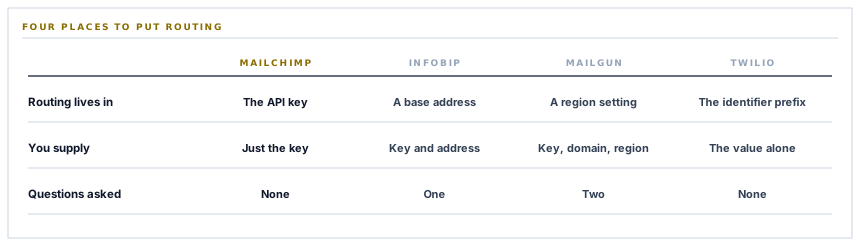
Four ways to answer the same question
Collected, because seeing them together is more useful than any one of them.
| Provider | Where routing lives | What you have to supply |
|---|---|---|
| Mailchimp | Inside the API key | Just the key |
| Infobip | A base address for your account | The key and the address |
| Mailgun | A region fixed when the domain was made | The key, the domain and the region |
| Twilio | A type prefix inside each identifier | The values, and nothing about their kinds |
The first and last rows are the same idea applied to different things: make the value describe itself, and the integration needs no extra question. Every question removed from a settings screen is a question nobody can answer wrongly.
The middle two are not mistakes — a region you choose deliberately is a data residency control, and that is a decision that should be visible rather than smuggled into a credential. But where the routing carries no meaning for the customer, hiding it inside the value is strictly better than asking.
What this connector is actually for
Worth stating clearly, because it is the odd one out among the email connectors here.
The other three send transactional mail — a purchase order to a supplier, an invoice to a customer, one message at a time, triggered by something happening. This one does not send anything. It keeps an audience list up to date.
-
Your customers and suppliers already exist as records
With names and email addresses, maintained as part of doing business rather than as a marketing exercise.
-
A marketing audience is a separate list
Usually maintained by hand, usually out of date, and usually the reason somebody exports a spreadsheet once a quarter.
-
This connector keeps the second in step with the first
Contacts are pushed into a chosen audience with their details, so the list reflects who you actually deal with.
-
And the campaign side stays where it belongs
Designing, sending and reporting on campaigns happen in Mailchimp. This is about the list rather than about the mail.
The boundary is deliberate. Marketing email carries consent obligations that differ by market and by contact, and those are decisions for the tool built around them rather than for an operations system pushing a list.
Two reads before anything is written
Setting this up involves two read-only calls, and both exist to make the configuration answerable rather than guessed.
One asks the provider whether the key works at all, which turns is this connected into a question with an answer rather than something you discover on the first sync.
The other fetches the audiences on the account, so the audience is chosen from a list rather than typed as an identifier. That removes an entire category of setup error — an audience identifier is an opaque string, and a typed one that is wrong produces a rejection naming a resource rather than a field.
Both are the same instinct as reading the server from the key: ask the provider rather than asking the person. They know the answer, and the person is guessing.
What is in place, layer by layer
The Mailchimp connector as it stands
Routing read from the credential
The server your account lives on is taken from the key's own suffix, so there is no region question on the settings screen.
The last separator, not the first
The suffix is read from the final hyphen, because the key body contains hyphens of its own and the naive split produces a hostname that does not exist.
A malformed key reads as unconnected
Without a suffix there is no address, so no client is built and the configuration is incomplete rather than connected-and-failing.
A connection check before anything is written
A read-only call answers whether the credential works, so connection status is a fact rather than something discovered on the first sync.
Audiences chosen from a list
The audiences on the account are fetched and presented, so nobody types an opaque identifier and nobody mistypes one.
The provider's own explanation surfaced
A refusal reports the human-readable sentence from Mailchimp's error document, with the raw response as a fallback.
The credential encrypted at rest
Stored on the row for one workspace, never in configuration, and never written into a log line or shown back in an error.
List keeping, not campaign sending
Contacts are pushed into an audience you choose. Designing, sending and reporting on campaigns stay in the tool built for them.
This is the one email connector that does not send mail. The other three carry transactional documents; this one keeps a marketing audience in step with the customers and suppliers you already have.
Three positions held on purpose
- A question the credential already answers is never asked. Every field on a settings screen is somewhere a person can be wrong, and the ones carrying no information the system could not derive are pure cost.
- An unusable credential reads as unconfigured rather than as broken. The two look identical to a person and have opposite fixes, and reporting the wrong one sends somebody investigating permissions when the value was truncated on paste.
- Campaign sending stays in the campaign tool. Marketing mail carries consent obligations that vary by market and by contact, and those belong to a product built around them rather than to an operations system pushing a list.
Five questions about credential handling
Do we need to tell you our region?
A good answer sounds like
No.
What ours actually is
It is read from the key's own suffix, so there is nothing to ask and nothing to get wrong.
What if the key is pasted incompletely?
A good answer sounds like
It says so.
What ours actually is
Without a suffix there is nothing to connect to, and it reads as unconfigured rather than as failing.
How do we pick the right audience?
A good answer sounds like
From a list.
What ours actually is
Fetched from your account and presented, rather than typed as an opaque identifier.
Can we tell it is working before syncing?
A good answer sounds like
Yes.
What ours actually is
A read-only check answers it, so connection status is a fact rather than a first-sync discovery.
Does this send our marketing email?
A good answer sounds like
No, honestly.
What ours actually is
It keeps the audience in step. Designing and sending campaigns stay in the tool built for them.
Our take
Self-describing values are one of the cheapest gifts an interface can give the people integrating with it. Put the data centre in the key and nobody has to be asked which region they are in. Put the object type in the identifier and nobody has to be asked what kind of thing they pasted. Every one of those is a settings field that does not exist, a support conversation that never happens, and a configuration error that cannot be made. It costs the provider a suffix. If you are designing something other people will connect to, it is close to the highest-leverage decision available.
Keep the audience in step with the business
The customers and suppliers you deal with already exist as records. A marketing list that reflects them is a sync rather than a quarterly spreadsheet.
Talk through contact syncingFrequently asked questions
Do we need to tell you which Mailchimp region we are in?
No. The region is part of the API key itself — the short code after its final hyphen — so the connector reads it from the credential you paste. There is no region field, because there is no question to ask.
Our key is not being accepted. What should we check?
Whether it was pasted whole. The suffix at the end is what tells the connector where to send requests, and a key truncated by a copy that stopped at a line break has no suffix. That case is reported as unconfigured rather than as a failing connection, so the message points at the field.
Does this send our marketing campaigns?
No. It keeps an audience in step with the customers and suppliers already in your workspace. Designing, sending and reporting on campaigns happen in Mailchimp, which is where the consent handling and the reporting live.
How do we choose which audience to sync into?
The audiences on your account are fetched and presented as a list, so you pick rather than type. An audience identifier is an opaque string, and a mistyped one fails with a message about a missing resource rather than about a wrong field.
What happens if Mailchimp rejects a contact?
The human-readable sentence from their error document is reported, with the raw response as a fallback for anything that does not match that shape. Their explanation usually names the exact reason, which is why it is passed through rather than paraphrased.
