
The Same Label, Twelve Times
A camera pointed at a carton fires the same barcode a dozen times before the operator lowers their arm. Four windows decide which of those reads is a scan, and two of them exist because the other two were not enough.
- Written by
- AWRA OpsHub TeamOperations Insights
- Issued
- Build
- Initial
Hold a phone over a label and the camera reads it every frame. Not once — every frame, for as long as it is pointed there. On a good phone in good light that is a dozen identical reads before the arm comes down, and each one arrives at the app as a barcode that has just been scanned. What the app does with the eleven it did not ask for is most of what separates a scanner that feels instant from one that quietly books eleven extra movements.
The interesting part is that they are not all the same mistake. A read 40 milliseconds after the last one is the camera. A read 20 seconds later is a person doing something deliberate — possibly the second of two identical cartons, possibly a duplicate they will regret. Treating those two alike is how a scanner ends up either dropping real work or booking imaginary work, and both failures look like the app being unreliable.
Four windows, and what each is protecting
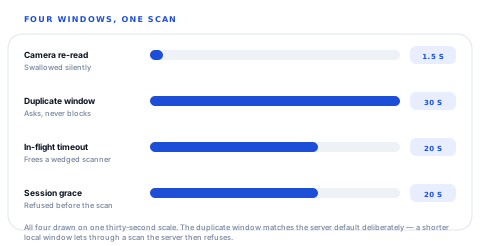
The first is the camera window and it is silent. Nothing is shown, nothing is logged for the operator, no confirmation is asked — because there is no decision to confirm. Nobody scanned twice; the hardware read twice. An app that asks "you already scanned this, continue?" a second and a half after the first read has misidentified its own camera as a person.
The second window is the opposite: it always asks and never blocks. Half a minute after the first read, a second scan of the same code is a real thing an operator did, and there is a completely ordinary reason for it — two identical cartons, two identical handsets, two of anything that carries the same label. The app is not in a position to know. So it asks, and the answer is good for another thirty seconds so that saying yes once does not mean saying yes on every frame.
Thirty seconds is not a taste in numbers
It is the server's own duplicate window, mirrored. The backend raises a duplicate on a repeat inside 30 seconds by default, and if the device were more permissive it would wave a scan through that the server then refuses — which reads to the operator as the app being broken, not as two systems disagreeing. A local window shorter than the server's is worse than no local window at all.
What the phone can decide, and what it cannot
The device guard only ever catches what never left the phone. It has no idea what the handset on the next aisle just scanned, and it does not pretend to: anything that crosses devices is the server's call, and the server keeps its own duplicate detection for exactly that.
Decided on the device
- The camera re-reading one stationary label. No round trip is worth spending on it.
- The same code twice in half a minute on this handset, where a confirmation costs nothing and prevents a real double-booking.
- A resolve that is still in flight, so the operator cannot start a second one on top of it.
- A pairing about to expire, which is knowable before the scan rather than after the failure.
Decided on the server
- The same code scanned on two different devices — the case a phone cannot see at all.
- Whether the code resolves to anything, across every record type the workspace holds.
- Whether this person may take this action on this record, by permission and by plan.
- The scan exceptions that stop bad work outright, which are the ones with consequences.
A guard on the device is an optimisation and a courtesy. It is never the rule — the rule has to live where every device can see it.
The scan that never came back
The third window is the one nobody thinks to specify, and it is the one that produces the worst bug report: the scanner has stopped working. A resolve goes out, the app locks the scanner so a second one cannot pile in on top of it, and then the answer never arrives — the request died with the screen, the network went, the process was backgrounded at the wrong moment. Without a timeout the lock is permanent and the scanner is wedged until the app is killed.
Twenty seconds is generous for a resolve and short enough that an operator has not yet decided the app is broken. Past it, the lock is assumed dead and the next scan is allowed through.
Refusing before the failure rather than after it
The fourth window is about a paired session — a phone acting as the scanner for a screen somewhere else. That pairing has an expiry, and the failure mode without a grace period is precise: the scan is captured, the resolve is sent, and the token dies somewhere in the middle. The operator gets an authentication error in the middle of a workflow, which tells them nothing and loses whatever they were doing.
So a session with less than twenty seconds left is treated as already gone. The scan, the resolve and the action that follows all have to fit in the time remaining, and a refusal before the scan — with an instruction to re-pair — is a far better experience than a 401 in the middle of one.
Is my scanner working right now?
That question is asked in the middle of a shift, by someone holding a phone, and it deserves an answer about the last few minutes rather than a monthly average. So the health card measures round trips locally, around each send.
What the health card is reading
The discard rule matters more than it looks. A negative or absurd round trip means the clock moved or the app was backgrounded mid-send, and averaging one of those in produces a health card that says the link is broken when the only broken thing was the measurement.
One deliberate asymmetry: a success clears the streak and never the total. Two failures in a row is a pattern worth surfacing now; eleven failures spread across a shift is the thing you want to know about at the end of it, and a counter that resets on every success would hide it completely.
Honest about its scope
These numbers are measured on the device because the server keeps no per-scan telemetry. That makes them exactly right for "is this handset having a bad afternoon" and useless as a fleet metric — a distinction worth stating rather than leaving a reader to assume the wider number exists somewhere.
Six answers, not two
| Verdict | What the operator sees | Why it is its own case |
|---|---|---|
| Accept | The beep and the buzz, immediately | The only path that costs a round trip. |
| Rapid repeat | Nothing at all | The camera, not a person. Telling somebody about it is noise. |
| In flight | A brief note that one is already running | Prevents a second action landing on top of the first. |
| Duplicate | A question, with how long ago the first one was | Overridable, because two identical cartons are ordinary. |
| Session stale | Re-pair before scanning | Said before the scan, when it can still be acted on. |
| Empty | Nothing usable in the frame | A blank read is not a failure worth a message. |
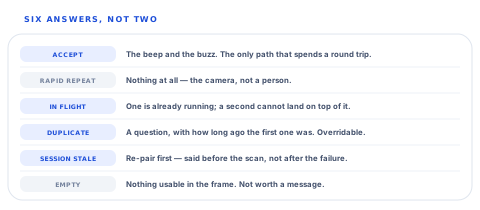
Two of those six are silent, one asks a question, one gives an instruction and one is the happy path. That distribution is the point. An app that reports all six is a stream of interruptions; an app that reports none of them is one that has quietly booked eleven movements you did not make.
Three questions for anybody selling you a scanning app
What happens when the camera reads the same label thirty times?
What you will hear
"It only counts once."
How to read it
Ask how long "once" lasts. There should be two numbers — a short one for the camera and a longer one for a person — and they should do different things. One number doing both jobs is either too chatty to use or too permissive to trust.
Does the phone or the server decide what a duplicate is?
What you will hear
"The app handles it."
How to read it
Both should, for different scopes, and the device window should not be shorter than the server's. A phone cannot see the handset on the next aisle, so a device-only answer means duplicates across a team are undetected.
What happens if a scan request never comes back?
What you will hear
A pause, then "it would retry".
How to read it
The failure to ask about is the scanner locking forever. There should be a stated timeout after which the next scan is allowed, or your operators will be restarting the app and calling it a crash.
Our take
Scanning is the feature most often demonstrated and least often specified. The demo is one label, once, in good light — and every system passes it. What decides whether a scanner survives a real aisle is a set of windows somebody was willing to name: how long the camera gets the benefit of the doubt, how long a repeat counts as a repeat, how long a request may hang before the scanner is freed, and how much session life is enough to start. Ours are a second and a half, thirty seconds matched to the server, twenty seconds, and twenty seconds. You may want different ones. What you should not accept is a scanner with none of them, because it will look identical in the demonstration and behave differently on the third pallet of the morning.
The windows are constants, which makes them commissionable
Every number on this page sits in one file with its reason written beside it. That is what makes each of them a candidate for being yours rather than ours, and these are the requests that come up most.
Windows tuned to your goods
Your own duplicate window per workspace or per action, so a warehouse of identical cartons and a workshop of unique serials are not held to the same rule.
Cross-device duplicate warnings on the phone
The server already knows when two handsets scan the same code. Surfacing that as a warning at the moment of the second scan is a defined piece of build.
Fleet-wide scanner health
Round-trip and failure rates gathered per device into one screen, so a handset that has been failing all week is visible before somebody reports it.
Symbology rules of your own
Accepting only the formats your labels actually use, and rejecting the rest at the camera, so a stray code on a passing box cannot start a workflow.
Each of these is a piece of work with a known shape rather than a research project, because the guard is one pure function over an explicit clock — which is also why every window on this page can be tested without waiting for it.
Tell us what your labels look likePoint it at your worst label
The useful test is not a clean barcode on a desk. It is a scuffed label on a shrink-wrapped pallet in a cold store, scanned by somebody wearing gloves who is already holding a clipboard.
Talk to us about scanningFrequently asked questions
Why does the app ignore some scans without telling me?
Because they were not scans. A camera re-reads a stationary label every frame, so a single deliberate scan arrives as a dozen identical reads inside a second and a half. Those are swallowed silently, because there is no decision for you to confirm — nobody scanned twice, the hardware read twice. A repeat after that window is treated as something you did, and you are asked about it.
I really do have two identical cartons. Can I scan the same code twice?
Yes. The duplicate check asks rather than blocks, and confirming it keeps that code good for another thirty seconds so you are not asked again on the next frame. The server keeps its own duplicate detection for the case a phone cannot see — the same code scanned on somebody else's handset.
What happens if the scanner stops responding?
A resolve that has not answered in twenty seconds is assumed dead and the scanner is unlocked for the next scan. Without that rule the lock is permanent whenever a request dies with the screen or the network, and the app appears to have stopped scanning until it is force-closed.
Why does it refuse to scan when my paired session is nearly expired?
Because the scan, the lookup and the action that follows all have to fit inside the time left, and a token that dies mid-workflow loses whatever you were doing and explains nothing. With less than twenty seconds of session remaining the app says so up front and asks you to re-pair, which costs a few seconds instead of a workflow.
Does the health card tell me about every device in the building?
No — it is this device, this session. The numbers are measured locally around each send because the server keeps no per-scan telemetry, which makes them honest about what this handset experienced and unable to speak for the fleet. Fleet-wide scanner health is one of the more frequently requested pieces of commissionable work.
Why does the failure count stay up after a successful scan?
Two failures in a row is a pattern worth interrupting you about, and a success clears that streak. The lifetime count for the session stays, because eleven failures spread across an afternoon is exactly the thing a reset-on-success counter would hide — and it is the number that tells you the link has been flaky all shift rather than briefly.
